
Webhooks
Send store events to Discord as embeds, or to your own systems as JSON.
Webhooks push notifications about store events somewhere else: a Discord channel, or your own endpoint. Most stores post sales into Discord, which doubles as social proof.
Dashboard → Integrations → Webhooks. Needs webhook_read. Available on every plan including Free.
For JSON webhooks, payload schemas and delivery semantics are in the developer docs. This page covers setup in the dashboard.
These webhooks notify. They do not deliver anything to the customer. If your store is not running a game server, the endpoint that fulfils orders is a delivery webhook and it is set up separately. See Delivery Methods.
Creating a Discord webhook
1. Create the webhook in Discord
If you haven't made one before, follow Discord's Intro to Webhooks. You need the resulting webhook URL.
2. Add it to PayNow
- Go to Integrations → Webhooks.
- Click Create in the top right.
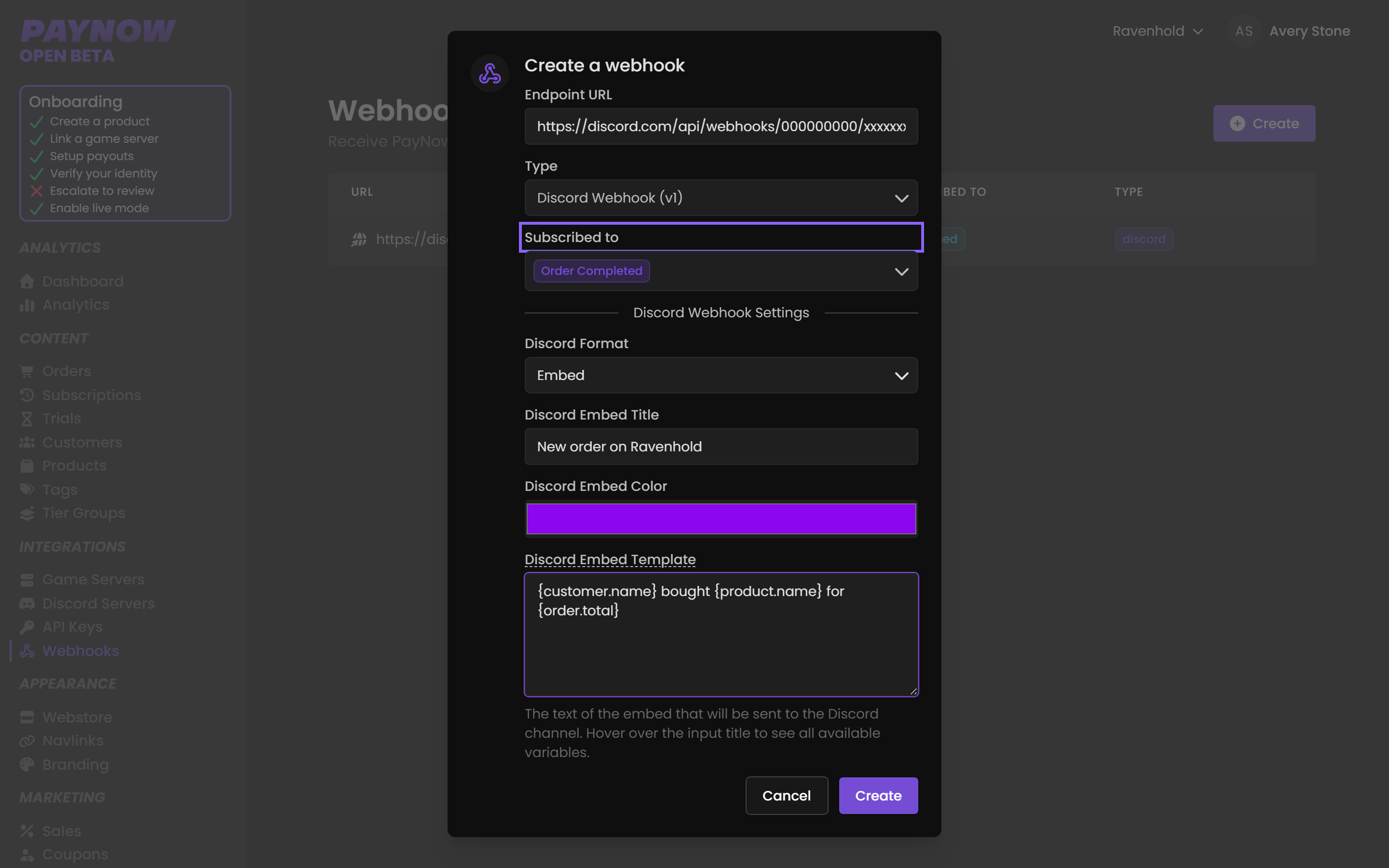
- Choose the type, Discord or JSON. Pasting a Discord URL selects Discord automatically.
- Paste the Discord webhook URL as the endpoint URL.
3. Subscribe to one event
In Subscribed To, select a single event. Start with Order Completed.
Use one webhook entry per event. Each event carries different variables, and one embed template can't render all of them. Separate entries also let you send refunds to a private staff channel while sales go to a public one.
4. Edit the embed
Hovering Discord Embed Template lists the variables for that event, and Discord Placeholders covers all of them. Ready-made embeds are on Steam Templates and Minecraft Templates. Press Update when it looks right.
5. Repeat for other events
Repeat for Refunds, Chargebacks, Subscriptions and anything else you want to see, adjusting the variables each time.
Which channel should receive what
| Event | Suggested destination | Why |
|---|---|---|
Order Completed | Public channel | Visible sales are social proof and drive more sales. |
| Refunds | Private staff channel | Not something to broadcast. |
| Chargebacks | Private staff channel | Needs a staff response, not an audience. |
| Subscription events | Staff channel | Useful for spotting churn early. |
Think before posting orders publicly. The embed can include customer names and purchase details. Some communities love a sales feed; others treat it as a privacy problem, especially where the purchase reveals something about the player. Include only the variables you'd be comfortable seeing about yourself.
Treat the webhook URL itself as a secret. Anyone holding it can post to that channel as your bot, so don't share it and mask it in screenshots.