Orders
Every transaction on your store, with the full detail behind each one.
An order is a single completed transaction. When a customer says "I paid and nothing happened", the order timeline usually answers it in seconds.
Dashboard → Content → Orders. Needs order_read.
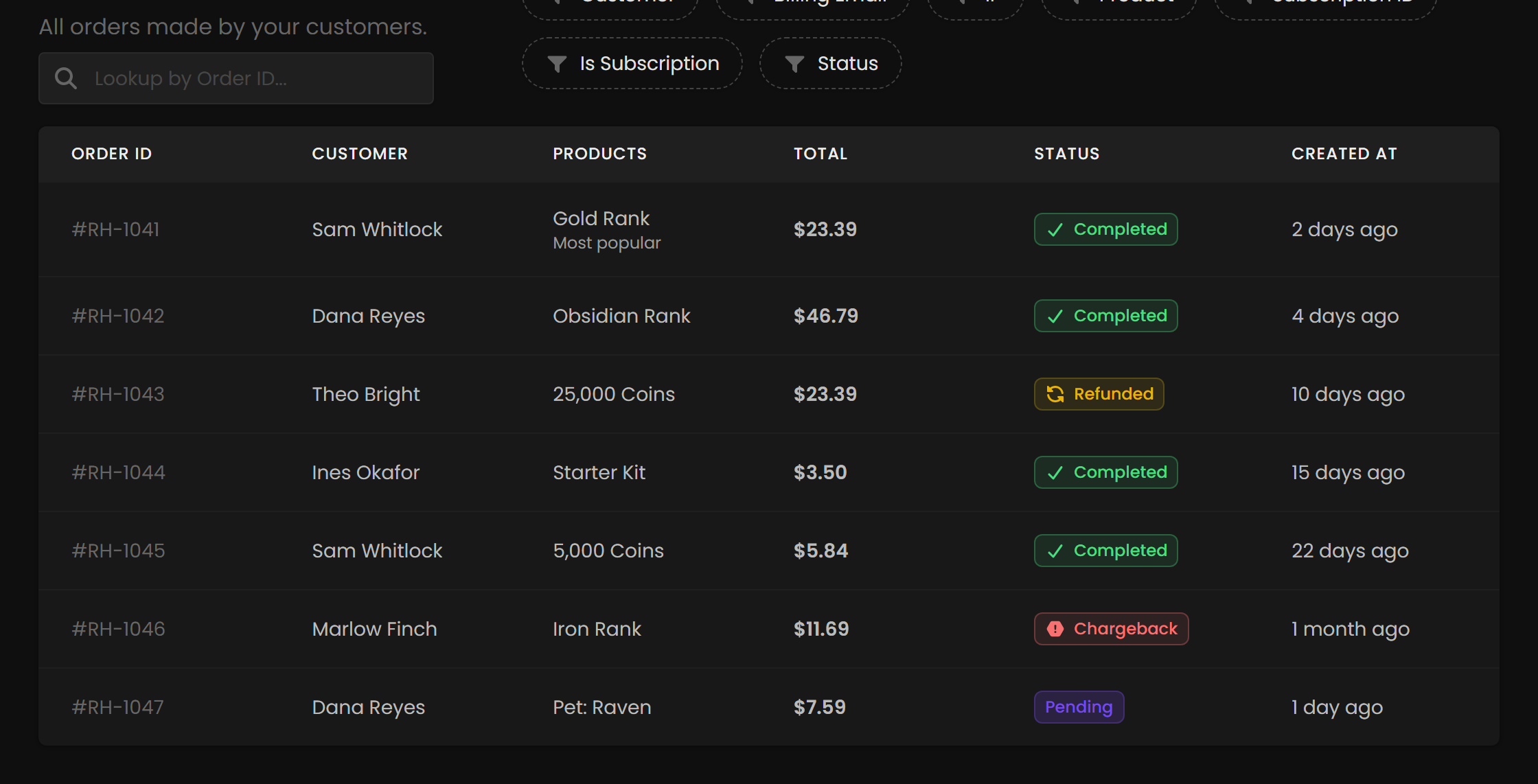
Total is the gross amount the customer paid, tax included — not the product's list price.
Finding an order
Search from the bar at the top left. You can also filter by Customer, Product, Subscription ID, Status, or whether the order is part of a subscription.
Ask customers for the order ID first; it turns a ten-minute hunt into a single search, and it's on their receipt email.
Inside an order
Clicking an order opens a full breakdown.
| Section | What it contains |
|---|---|
| Order Summary | Total amount, currency, and subscription status if applicable. |
| Customer Card | Username, avatar, and platform identifiers such as SteamID. |
| Order Details | Creation and completion timestamps, Steam ID, customer info. |
| Billing Information | Name, email, country. |
| Payment Info | Method, card brand, last four digits, expiry, funding type, country. |
| Network Info | IP address. |
| Line Items | Products purchased, price, quantity. |
| Timeline | Live status updates: creation, completion, and command execution. |
Go straight to the timeline. Whether the command ran splits the problem in two. If it didn't, it's a delivery problem: check Game Servers and the product's commands. If it did, it's a game-side problem: the plugin, permissions, or the player being offline.
Hovering reveals more. The Steam and gift icons carry extra information, the gift box icon on a gifted product shows who sent it, and the Discord icon copies the customer's unique checkout URL, which is what you need when someone forgets to link their Discord after purchase.
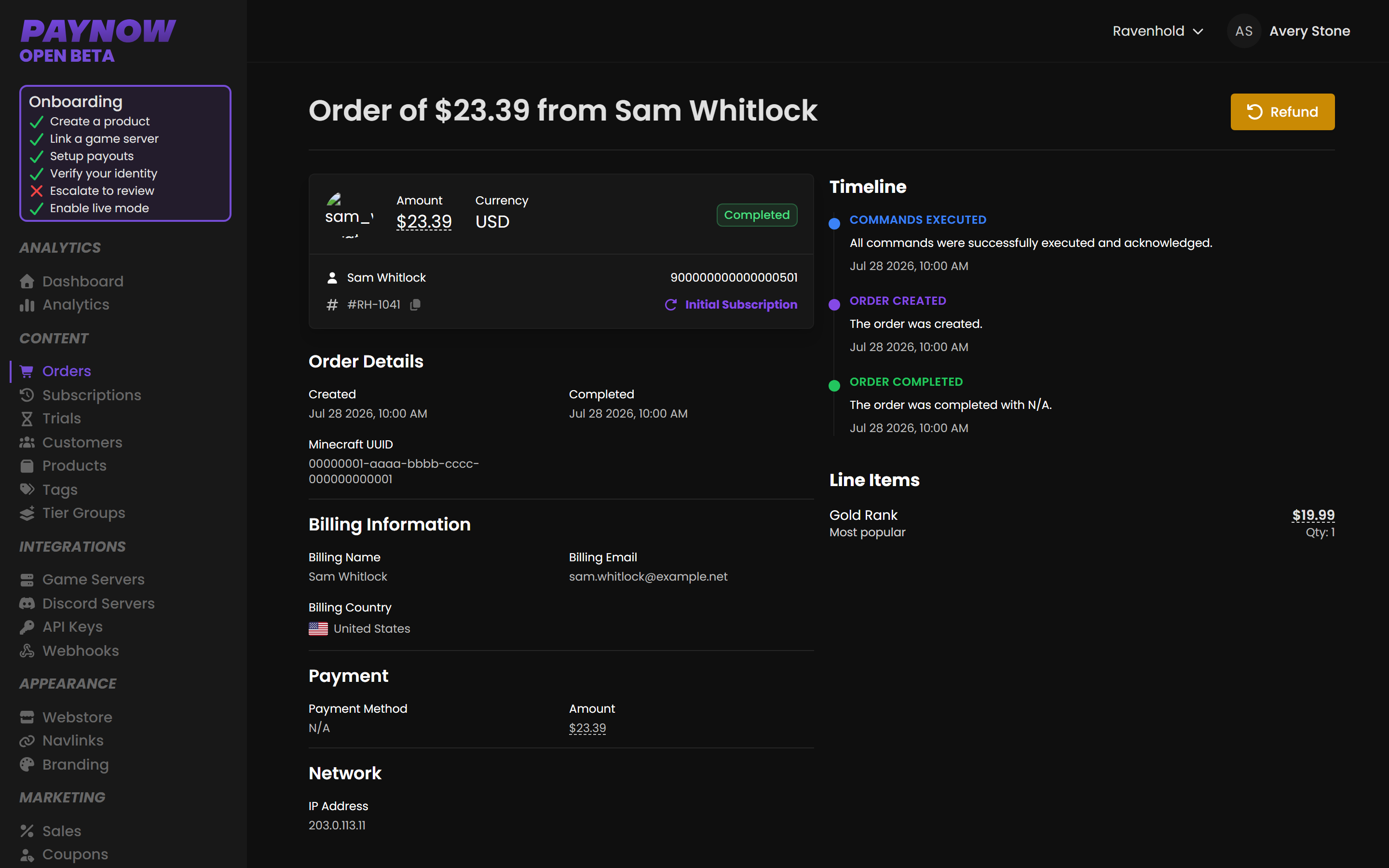
The timeline tells you whether delivery actually happened.
Order statuses
| Status | Meaning | What to do |
|---|---|---|
| Created | Generated but not completed. | Usually an abandoned or in-flight payment. See Abandoned Checkouts. |
| Completed | Processed successfully. | Nothing. |
| Refunded | Money returned. | Consider whether to also revoke the item from the customer's inventory. |
| Chargeback | The customer disputed the charge with their bank. | See below. |
Chargebacks are not refunds. The customer went to their bank rather than to you, and a pattern of them puts the store at risk: PayNow locks stores with an unacceptably high chargeback rate.
Most are preventable. A customer who can't find how to cancel, or can't reach you, disputes instead. Two cheap defences: publish checkout.paynow.gg/subscriptions where subscribers can cancel themselves, and monitor the support email on your store.
When one happens, check whether the customer also holds active access, and consider a ban.
Refunding
Refunding returns the money. It is a separate action from revoking: to take the item back, revoke it from their inventory. Refunding one subscription payment does not stop future renewals either, so cancel the subscription as well.
Revoking runs the product's On Expire stage, so your expiry commands and any Discord role set to come off on Expiration all fire. A refund on its own runs the On Refund stage, and only if you configured one. See Commands & Placeholders.
You need the money to refund with. A refund comes out of your payout balance, so if the balance is lower than the amount you are returning, the refund will not go through until it is topped up by new sales.
The customer sees the money back on their original payment method in 2 to 3 business days.
Who decides a refund
Customers are told to ask you first, and most refunds should be settled there. You can act immediately, and you can often fix the problem instead of refunding it.
A request you decline or leave unanswered can go to PayNow. Under the Creator Agreement you authorise PayNow, as merchant of record, to decide refund requests at its discretion and to handle disputes and chargebacks on your behalf. Where PayNow does not approve one, you can still refund the buyer yourself.
Two things follow that are easy to miss:
- No fees come back on a refund. The customer receives the full amount, but the platform fee and the gateway's processing fee are both kept. A refund costs you the sale plus every fee that was already taken from it. The per-order fee breakdown is in Transactions.
- Problems with the Item itself are yours to resolve with the buyer. Delivery, access and whether the product does what you said are all things only you can fix.
Point customers at Refunds and Cancellations so they arrive with an order ID.
A purchase delivered to the wrong game account does not need a refund. Revoke it from that customer's inventory and assign it to the right one.