
Abandoned Checkouts
Automatically email a discount coupon to customers who left without completing their purchase.
When a customer starts a checkout and does not finish, PayNow can email them a discount coupon to bring them back.
Dashboard → Marketing → Abandoned Checkouts. Needs abandoned_checkout_read. Available on every plan including Free.
Customers must have accepted email marketing consent during a previous checkout session to be eligible, so recovery only works for people who have checked out with you before.
Enabling it
- Go to Marketing → Abandoned Checkouts.
- Toggle "Send automated emails with discount coupons to recover abandoned checkouts".
PayNow then monitors for abandoned checkouts and attempts recovery with a coupon built from your configuration.
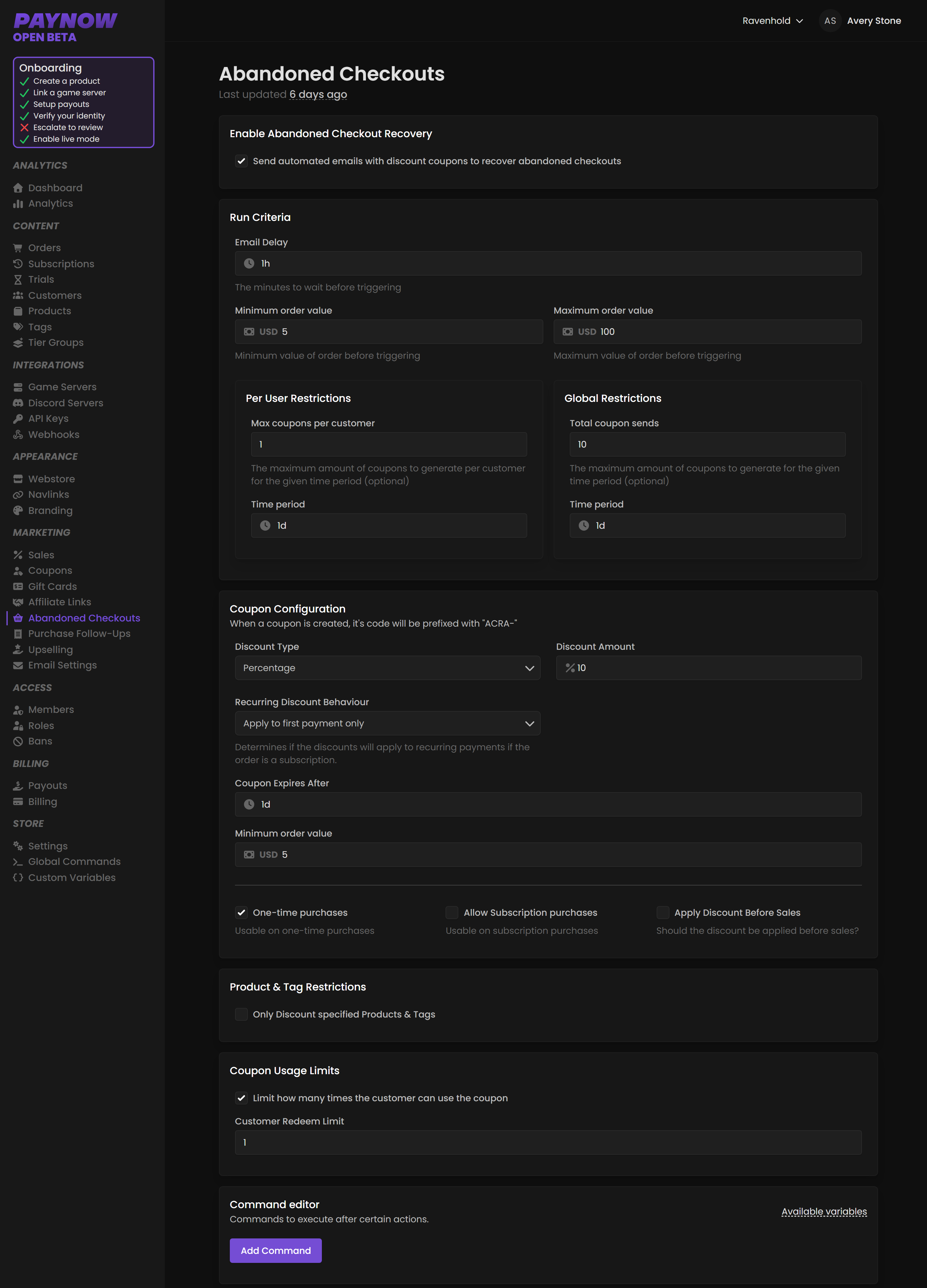
Run Criteria
When a recovery email should fire.
| Setting | What it does |
|---|---|
| Email Delay | How long to wait after abandonment before sending, e.g. 1 hour. |
| Minimum Order Value | Only trigger if the cart total is at least this. |
| Maximum Order Value | Only trigger if the cart total is below this. |
Too soon reads as surveillance; too late and they have forgotten or bought elsewhere. An hour is a sensible starting point. A minimum order value stops you discounting $2 carts, where the coupon costs more than the sale is worth.
Per user restrictions cap max coupons per customer in a period, e.g. 1 every 1 day. Global restrictions cap total coupon sends in a period, e.g. 10 every 1 day.
Set both restrictions before enabling this. Without a per-user cap, someone can discover that abandoning a cart produces a discount code and never pay full price again. Without a global cap, a traffic spike or a broken checkout can generate a flood of coupons in one day, each one a real discount you have to honour.
Coupon Configuration
| Setting | What it does |
|---|---|
| Discount Type | Percentage or Fixed amount. |
| Discount Amount | The discount, e.g. 10%. |
| Recurring Discount Behaviour | For subscription products: Apply to first payment only, Apply to specified renewals of recurring payments, or Apply to all re-occuring payments. |
| Coupon Expiry | How long the coupon stays valid, e.g. 1 day. |
| Minimum Order Value | Only apply if the new order meets this. |
Redemption rules control whether the coupon works on one-time and subscription purchases, and and Apply Discount Before Sales, which changes the order the two discounts are calculated in. Work out what the combined discount costs before you turn it on. The older PayNow docs call this same setting "Apply even during other sales".
Keep the expiry short. Urgency is what converts, and one day is typical.
Recurring Discount Behaviour set to "all payments" discounts every future renewal, for a customer who merely hesitated once. That is a permanent cut to your recurring revenue in exchange for one recovered signup. First payment only is almost always right.
Filtering
Product & Tag Restrictions limit recovery discounts to specific products or tags. Coupon Usage Limits set how many times a customer can use the code.
Notes and limits
Emails are automatic and not yet customisable. Your Support Email from Settings appears in them, so make sure it is one you monitor.
Abandonment as a diagnostic
A sudden jump in abandonment usually means something broke, not that your pricing changed. Check whether you changed checkout branding, changed your upsell style, whether payment methods are available in your customers' regions, and whether a price change landed recently.