
Trials
Give customers a free period before billing starts, with cooldown rules to stop trial farming.
A trial gives a customer full access to a subscription product for a set period before the first charge. If they don't cancel, it converts to a paid subscription automatically.
Dashboard → Content → Trials. Needs trial_read. Subscription products only.
Enabling trials on a product
- Go to **Content → Products → **(your product).
- Under Lifetime → Trial configuration, enable Allow Trials.
- Set the Trial Period, for example 7 days.
- Optionally enable New Customers Only.
- Optionally configure cooldowns (below).
- Save.
Access begins as soon as the trial starts. If the customer doesn't cancel before the end date, the subscription converts to paid automatically at the listed price. The rest of the product form is covered in Creating a Product.
Trial settings
| Field | What it does |
|---|---|
| Allow Trials | Enables trials for this product. |
| Trial Period | Length of the trial, in days, weeks or months. |
| Revoke immediately when canceled | Removes access the moment a customer cancels during the trial, rather than letting it run to the scheduled end. |
| New Customers Only | Only customers with no prior orders of this product can start a trial. |
| Customer must have no orders in the last X days | Store-wide cooldown. Blocks anyone who bought anything from you recently. |
| Allow Repeat Trials | Permits a second trial after a cooldown. |
| Customer must not have ordered the product in the last X days | Per-product cooldown. Only applies when Allow Repeat Trials is on. |
Leaving Revoke immediately when canceled off is more generous, but someone can then start a trial, cancel straight away, and keep access for the full period. Turn it on where the perk has real value.
Choosing cooldown settings
The cooldown fields stop trial farming, where customers cycle free periods instead of paying. How aggressive to be depends on what you're selling.
| Your situation | Suggested setup |
|---|---|
| Standard rank trial | New Customers Only on, repeat trials off. Simplest and hardest to abuse. |
| Win-back campaign for lapsed subscribers | Repeat trials on, per-product cooldown of 90+ days. |
| High-value perk | New Customers Only on, Revoke immediately when canceled on. |
| Low-risk cosmetic | Repeat trials on, short cooldown. Abuse costs you little. |
How a trial runs
A trial begins at checkout once the customer opts into the subscription, and gives them the product's full subscription benefits. Cancel during the trial and access is revoked immediately if the revoke toggle is on, otherwise at the scheduled end. Once cancelled or expired, access is removed and billing stops.
Managing trials
Content → Trials lists every trial: active, completed and cancelled.
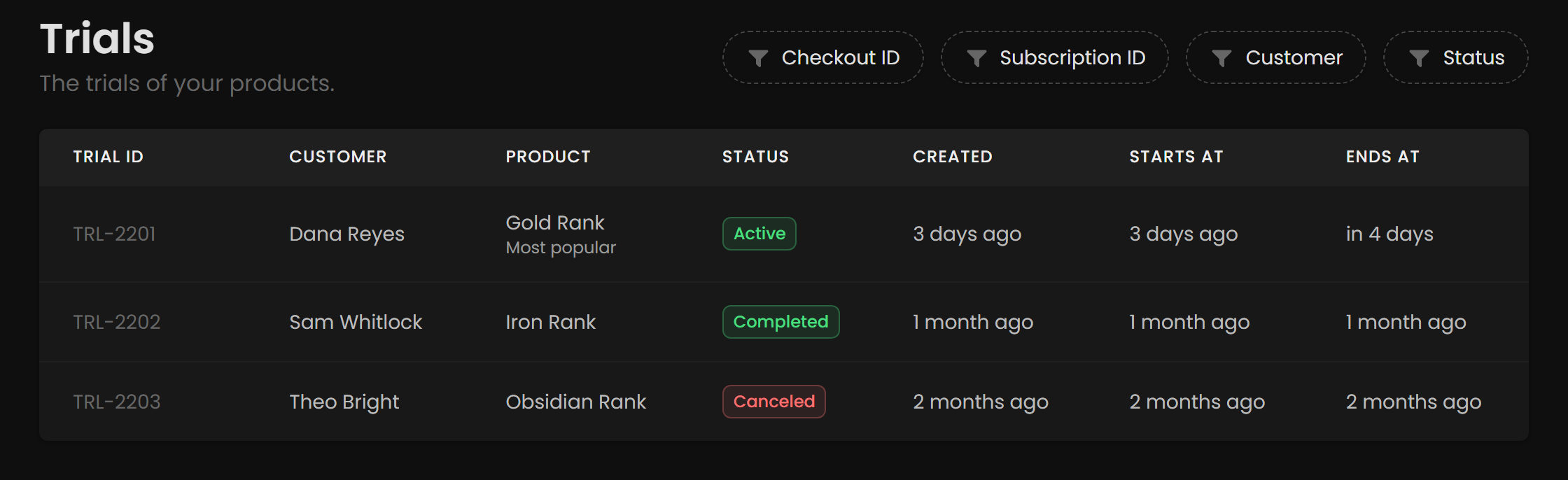
| Column | Meaning |
|---|---|
| Trial ID | Unique identifier. Quote this to support. |
| Customer | Who started it. |
| Product | What is being trialled. |
| Status | Created, Active, Canceled or Completed. |
| Created | When the trial record was made. |
| Starts At | When access begins. |
| Ends At | When it converts to paid, or is revoked. |
Filter using the controls in the top right: Checkout ID, Subscription ID, Customer, or Status. Clicking a trial opens its detail view, where you can end the trial early. You can also end one early from the related subscription.
Checking whether trials are working
Check Analytics → Recurring Payments after your first month.
| What you see | What it usually means |
|---|---|
| High trial starts, low conversion | The perk isn't compelling, or the trial runs long enough that the novelty wears off before the charge. Try shortening it. |
| Low trial starts | Customers can't find it, or don't trust it. Make the free period explicit on the storefront. |
| Good conversion but churn at month two | The trial oversold what the product delivers. |