
Purchase Follow-Ups
Email a discount coupon to customers after a successful purchase to bring them back for a second one.
Where Abandoned Checkouts chases people who did not buy, follow-ups target people who did, sending a coupon some time after a completed purchase to encourage the next one.
Dashboard → Marketing → Purchase Follow-Ups. Needs purchase_follow_up_read. Available on every plan including Free.
Customers must have accepted marketing consent during any previous checkout, either a completed order or a previous abandoned checkout where consent was given.
Enabling it
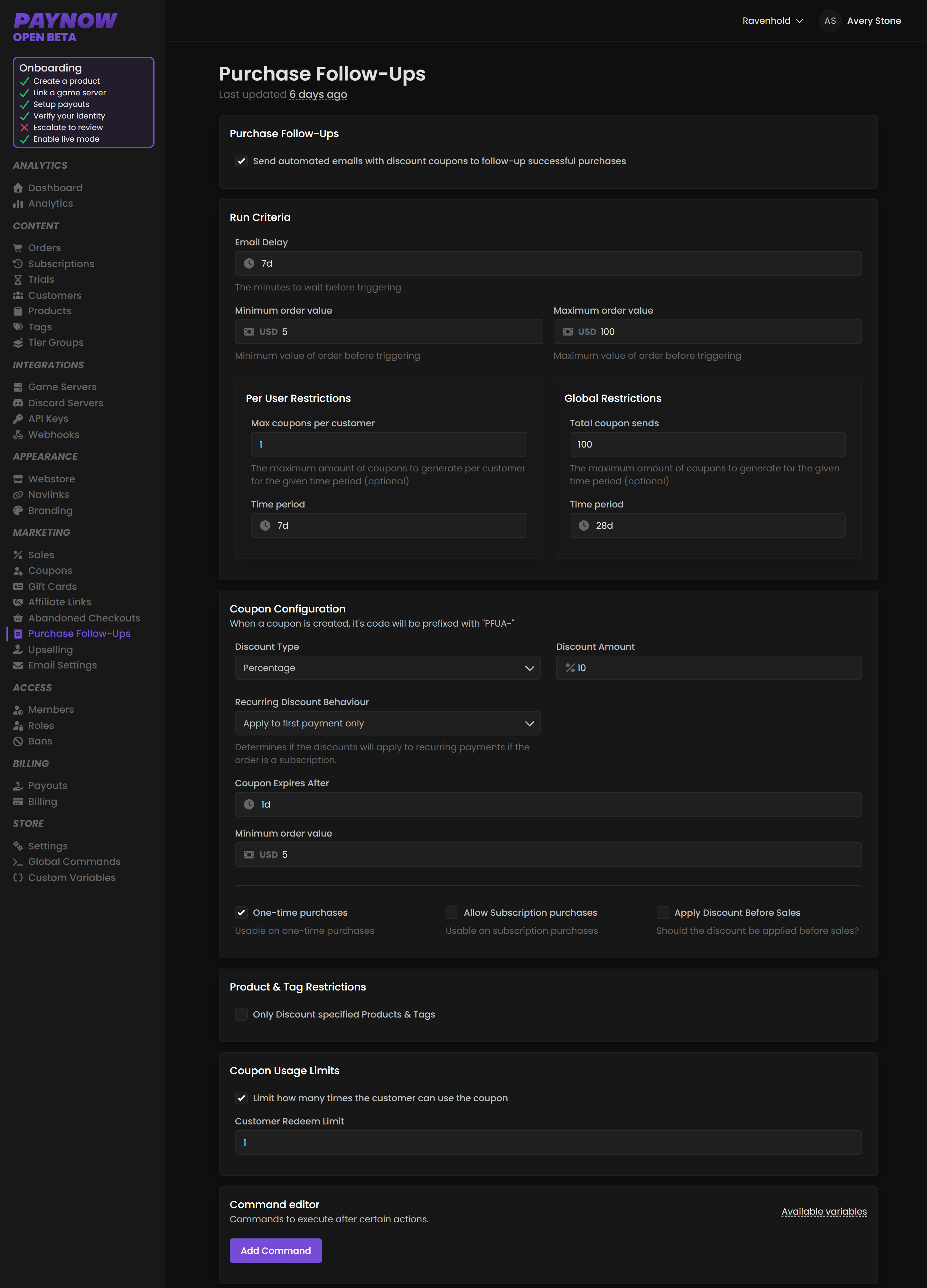
Go to Marketing → Purchase Follow-Ups and toggle "Send automated emails with discount coupons to follow-up successful purchases".
Run Criteria
Which orders qualify.
| Setting | What it does |
|---|---|
| Email Delay | How long after purchase to wait, e.g. 7d. |
| Minimum Order Value | Only trigger at or above this total. |
| Maximum Order Value | Optionally skip orders above this total. |
The delay is the strategy. Too short and you are discounting a customer who was about to buy again anyway. Long enough that they have used what they bought, and the coupon arrives as a prompt rather than a price cut. Seven days is a reasonable default; if you sell monthly ranks, consider timing it near the end of the period instead.
Set a maximum order value as well. Your highest-spending customers do not need a discount to buy again, so capping it points follow-ups at the middle of your customer base.
Per user restrictions
| Setting | Example |
|---|---|
| Max Coupons Per Customer | 1 |
| Time Period | 7d, so at most one coupon every 7 days per user |
Global restrictions
| Setting | Example |
|---|---|
| Total Coupon Sends | 100 |
| Time Period | 28d, so at most 100 sends every 28 days |
Coupon Configuration
| Setting | What it does |
|---|---|
| Discount Type | Percentage or fixed. |
| Discount Amount | e.g. 10% or $5. |
| Recurring Discount Behaviour | First payment only, or all recurring payments. |
| Coupon Expiry | e.g. 1d. |
| Minimum Order Value | Optional threshold to use the coupon. |
Purchase conditions enable or disable One-Time Purchases and Subscription Purchases, and Apply Discount Before Sales decides whether the coupon applies before active sales.
"All recurring payments" permanently discounts every renewal for that customer, as with abandoned checkouts. Use first payment only unless you are deliberately running a long-term loyalty discount.
Filtering
Product & Tag Restrictions limit follow-ups to specific products or tags, and Coupon Usage Limits set how many times a customer can use the code.
Point follow-ups at products the customer did not just buy. A coupon for something they already own converts nobody: send a currency coupon to someone who bought a rank, not another rank.
Your Support Email from Settings appears in these emails.
What the emails look like, and how they performed
The email itself is PayNow's template. Its content and design cannot be customised — the rules above control who gets one and which coupon it carries, not what it says or looks like. Custom content is planned, without a date.
Results live under Analytics → Marketing, alongside the other automated campaigns, so you can see whether the coupons are converting before widening the criteria.
Follow-ups versus upselling
Both grow order value, at different moments.
| Upselling | Purchase Follow-Ups | |
|---|---|---|
| When | During checkout | Days after purchase |
| Costs you | Margin on the upsell | Margin on a future sale |
Try upselling first. It is free to attempt, and costs you a discount only if it works.